
PEFT documentation
LoRA
LoRA
LoRA is one of the most popular PEFT methods and a good starting point if you’re just getting started with PEFT. It was originally developed for large language models but it is a tremendously popular training method for diffusion models because of its efficiency and effectiveness.
Low-Rank Adaptation (LoRA) is a PEFT method that decomposes a large matrix into two smaller low-rank matrices. This drastically reduces the number of parameters that need to be fine-tuned.
The abstract from the paper is:
An important paradigm of natural language processing consists of large-scale pre-training on general domain data and adaptation to particular tasks or domains. As we pre-train larger models, full fine-tuning, which retrains all model parameters, becomes less feasible. Using GPT-3 175B as an example — deploying independent instances of fine-tuned models, each with 175B parameters, is prohibitively expensive. We propose Low-Rank Adaptation, or LoRA, which freezes the pre-trained model weights and injects trainable rank decomposition matrices into each layer of the Transformer architecture, greatly reducing the number of trainable parameters for downstream tasks. Compared to GPT-3 175B fine-tuned with Adam, LoRA can reduce the number of trainable parameters by 10,000 times and the GPU memory requirement by 3 times. LoRA performs on-par or better than fine-tuning in model quality on RoBERTa, DeBERTa, GPT-2, and GPT-3, despite having fewer trainable parameters, a higher training throughput, and, unlike adapters, no additional inference latency. We also provide an empirical investigation into rank-deficiency in language model adaptation, which sheds light on the efficacy of LoRA. We release a package that facilitates the integration of LoRA with PyTorch models and provide our implementations and model checkpoints for RoBERTa, DeBERTa, and GPT-2 at this https URL.
LoRA represents the weight updates with two smaller matrices (called update matrices) through low-rank decomposition. These new matrices can be trained to adapt to the new data while keeping the overall number of parameters low. The original weight matrix remains frozen and doesn’t receive any further updates. To produce the final results, the original and extra adapted weights are combined. You could also merge the adapter weights with the base model to eliminate inference latency.
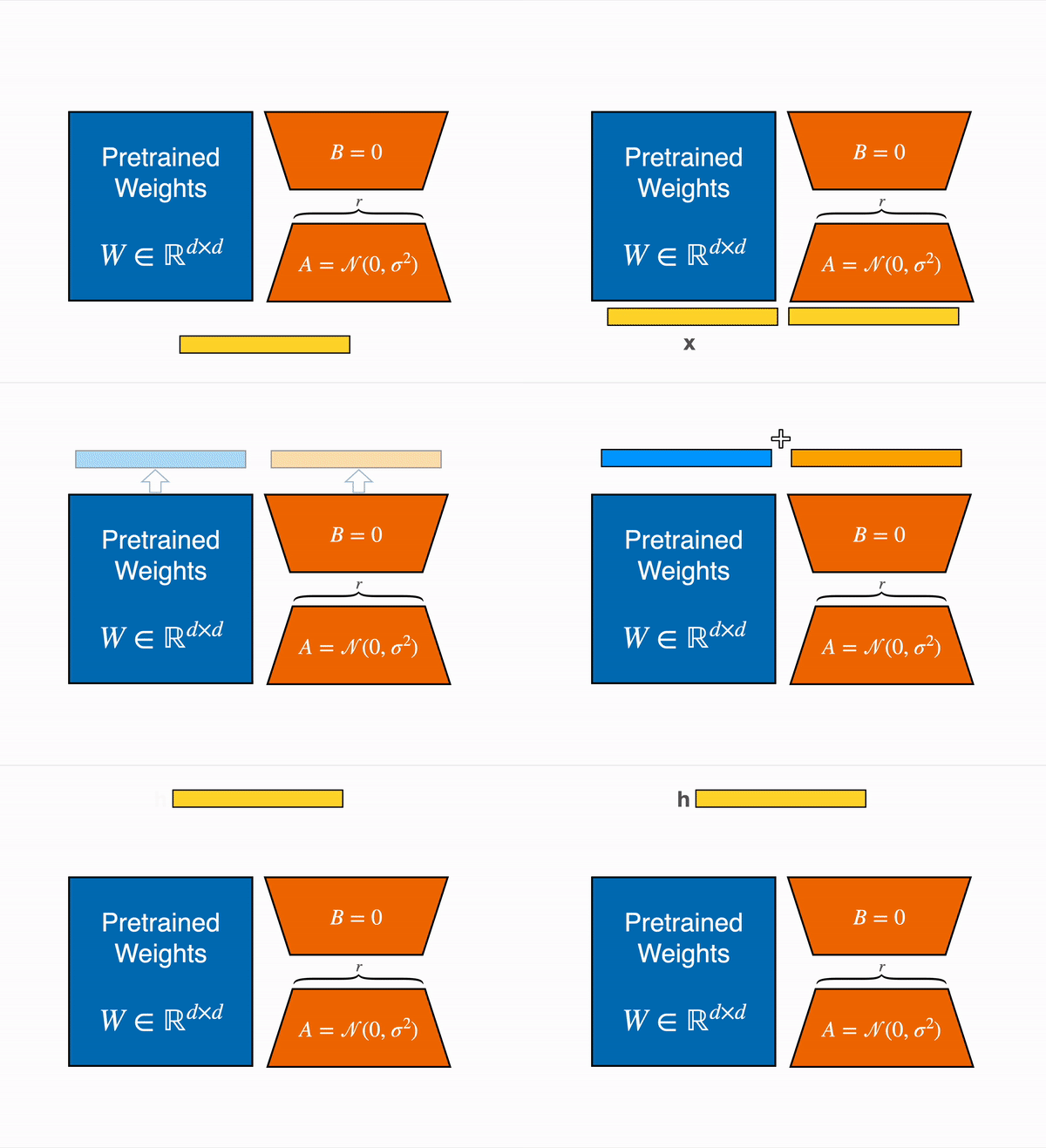
This approach has a number of advantages:
- LoRA makes finetuning more efficient by drastically reducing the number of trainable parameters.
- The original pretrained weights are kept frozen, which means you can have multiple lightweight and portable LoRA models for various downstream tasks built on top of them.
- LoRA is orthogonal to other parameter-efficient methods and can be combined with many of them.
- Performance of models finetuned using LoRA is comparable to the performance of fully finetuned models.
In principle, LoRA can be applied to any subset of weight matrices in a neural network to reduce the number of trainable parameters. However, for simplicity and further parameter efficiency, LoRA is typically only applied to the attention blocks in Transformer models - it may be worth targeting other layers as well. The resulting number of trainable parameters in a LoRA model depends on the size of the update matrices, which is determined mainly by the rank r and the shape of the original weight matrix.
You can initialize the low-rank matrices with different use-cases in mind - task awareness (CoRDA, EVA), faster convergence (PiSSA), mitigating quantizations (LoftQ) - just to name a few use-cases. Read about the different initializations below. The default initialization is for LoRA to be a no-op, to gradually learn new behavior without interfering much with the existing model.
Usage
The size of the low-rank update matrices is determined by the rank or r. A higher rank means the model has more parameters to train, but it also means the model has more learning capacity. In the following example, you’ll target the query and value matrices of the attention blocks. Other important parameters to set are lora_alpha (scaling factor), bias (whether none, all or only the LoRA bias parameters should be trained), and modules_to_save (the modules apart from the LoRA layers to be trained and saved). All of these parameters - and more - are found in the LoraConfig.
from peft import LoraConfig, get_peft_model

config = LoraConfig(
    r=16,
    lora_alpha=16,
    target_modules=["query", "value"],
    lora_dropout=0.1,
    bias="none",
    modules_to_save=["classifier"],
)
model = get_peft_model(model, config)
model.print_trainable_parameters()
"trainable params: 667,493 || all params: 86,543,818 || trainable%: 0.7712775047664294"
Benchmark overview
Initialization
The initialization of LoRA weights is controlled by the parameter init_lora_weights in LoraConfig. By default, PEFT initializes LoRA weights with Kaiming-uniform for weight A and zeros for weight B resulting in an identity transform (same as the reference implementation).
It is also possible to pass init_lora_weights="gaussian". As the name suggests, this initializes weight A with a Gaussian distribution and zeros for weight B (this is how Diffusers initializes LoRA weights).
from peft import LoraConfig

config = LoraConfig(init_lora_weights="gaussian", ...)
There is also an option to set init_lora_weights=False which is useful for debugging and testing. This should be the only time you use this option. When choosing this option, the LoRA weights are initialized such that they do not result in an identity transform.
from peft import LoraConfig

config = LoraConfig(init_lora_weights=False, ...)
PiSSA initializes the LoRA adapter using the principal singular values and singular vectors. This straightforward modification allows PiSSA to converge more rapidly than LoRA and ultimately attain superior performance. Moreover, PiSSA reduces the quantization error compared to QLoRA, leading to further enhancements.
Configure the initialization method to “pissa”, which may take several minutes to execute SVD on the pre-trained model:
from peft import LoraConfig
config = LoraConfig(init_lora_weights="pissa", ...)
Alternatively, execute fast SVD, which takes only a few seconds. The number of iterations determines the trade-off between the error and computation time:
lora_config = LoraConfig(init_lora_weights="pissa_niter_[number of iters]", ...)For detailed instruction on using PiSSA, please follow these instructions.
Training
This section shows how to handle more complex training scenarios instead of only applying a low-rank adapter to the model and feed data.
QLoRA-style training
The default LoRA settings in PEFT add trainable weights to the query and value layers of each attention block. But QLoRA, which adds trainable weights to all the linear layers of a transformer model, can provide performance equal to a fully finetuned model. To apply LoRA to all the linear layers, like in QLoRA, set target_modules="all-linear" (easier than specifying individual modules by name which can vary depending on the architecture).
config = LoraConfig(target_modules="all-linear", ...)For more information about how to apply quantization to PEFT adapters, refer to the quantization guide.
Memory efficient Layer Replication with LoRA
An approach used to improve the performance of models is to expand a model by duplicating layers in the model to build a larger model from a pretrained model of a given size. For example increasing a 7B model to a 10B model as described in the SOLAR paper. PEFT LoRA supports this kind of expansion in a memory efficient manner that supports further fine-tuning using LoRA adapters attached to the layers post replication of the layers. The replicated layers do not take additional memory as they share the underlying weights so the only additional memory required is the memory for the adapter weights. To use this feature you would create a config with the layer_replication argument.
config = LoraConfig(layer_replication=[[0,4], [2,5]], ...)Assuming the original model had 5 layers [0, 1, 2 ,3, 4], this would create a model with 7 layers arranged as [0, 1, 2, 3, 2, 3, 4]. This follows the mergekit pass through merge convention where sequences of layers specified as start inclusive and end exclusive tuples are stacked to build the final model. Each layer in the final model gets its own distinct set of LoRA adapters.
Fewshot-Metamath-OrcaVicuna-Mistral-10B is an example of a model trained using this method on Mistral-7B expanded to 10B. The adapter_config.json shows a sample LoRA adapter config applying this method for fine-tuning.
Fine grained control over ranks and alpha (scaling)
By default, all layers targeted with LoRA will have the same rank r and the same lora_alpha (which determines the LoRA scaling), depending on what was specified in the LoraConfig. In some cases, however, you may want to indicate different values for different layers. This is possible by passing the rank_pattern and alpha_pattern arguments to LoraConfig. These arguments should be dictionaries with the key being the layer name and the value being the rank/alpha value. The keys can be regular expressions (regex). All LoRA layers that are not explicitly mentioned in rank_pattern and alpha_pattern will take the default r and lora_alpha values.
To give an example, let’s assume that we have a model with the following structure:
>>> print(model)
Outer(
  (foo): Linear(...)
  (module): Middle(
    (foo): Linear(...)
    (foobar): Linear(...)
    (module): Inner(
      (foo): Linear(...)
      (barfoo): Linear(...)
    )
  )
)
rank_pattern={"foo": 42}will match all 3foolayers. Neitherfoobarnorbarfooare matched.rank_pattern={"^foo": 42}will only match thefoolayer of the model, but neithermodule.foonormodule.module.foo. This is because the^means “start of string” when using regular expressions, and onlyfoostarts with"foo", the other layer names have prefixes.rank_pattern={"^module.foo": 42}matches onlymodule.foo, but notmodule.module.foo, for the same reason.rank_pattern={"module.foo": 42}matches bothmodule.fooandmodule.module.foo, but notfoo.rank_pattern={"^foo": 42, "^module.module.foo": 55}matchesfooandmodule.module.foo, respectively, but notmodule.foo.- There is no need to indicate
$to mark the end of the match, as this is added automatically by PEFT.
The same logic applies to alpha_pattern. If you’re in doubt, don’t try to get fancy with regular expressions — just pass the full name for each module with a different rank/alpha, preceded by the ^ prefix, and you should be good.
Automatically detect viable target modules
peft.helpers.KappaTuneSelector implements the condition-number-based target selection strategy from the KappaTune paper. It scans every nn.Linear module and, for models where MoE expert weights are stored as fused 3D nn.Parameter tensors (e.g. Llama-4, Qwen3-MoE), also those parameters, computes the matrix condition number κ = σ_max / σ_min for each, and selects the most isotropic layers (lowest κ). These isotropic layers serve as ideal candidates for fine-tuning, since their high-entropy nature allows them to absorb new information more readily, leaving the specialized, anisotropic layers intact to mitigate catastrophic forgetting during continual learning.
Use peft.helpers.find_kappa_target_modules() as a one-liner to get the optimal target_modules for LoraConfig:
from peft import LoraConfig, get_peft_model
from peft.helpers import find_kappa_target_modules

model = AutoModelForCausalLM.from_pretrained("mistralai/Mixtral-8x7B-Instruct-v0.1")

targets = find_kappa_target_modules(model, top_p=0.2)
config = LoraConfig(
    target_modules=targets["target_modules"],
    target_parameters=targets["target_parameters"] if stable_modules_dic["target_parameters"] else None,
    r=64,
    lora_alpha=32,
    task_type="CAUSAL_LM",
)
peft_model = get_peft_model(model, config)
See a complete example here.
Targeting nn.Parameter directly
Generally, you should use target_modules to target the module (e.g. nn.Linear). However, in some circumstances, this is not possible. E.g., in many mixture of expert (MoE) layers in HF Transformers, instead of using nn.Linear, an nn.Parameter is used. PEFT normally overwrites the forward method for LoRA, but for nn.Parameter, there is none. Therefore, to apply LoRA to that parameter, it needs to be targeted with target_parameters. As an example, for Llama4, you can pass: target_parameters=['feed_forward.experts.gate_up_proj', 'feed_forward.experts.down_proj].
Note that when targeting expert parameters, PEFT can add a substantial runtime overhead. The reason is that PEFT always materializes the LoRA contribution for each expert even if only a small amount of experts is required. During training, this is less relevant since, over the course of the sequence, typically a large fraction of experts is activated at least once. However, during inference, normally a KV cache is used and we thus need to only compute the last token, which means that only a small amount of experts is activated. Therefore, using LoRA on MoE layers can result in a substantial slowdown at inference time. The recommendation is thus to merge the weights (model.merge_adapter() or model = model.merge_and_unload()). This removes the PEFT overhead.
A more detailed investigation of this issue can be found on this pull request on MoE optimization.
Caveats
- At the moment, this argument allows to target 2-dim or 3-dim
nn.Parameters. It is assumed that in the case of a 3-dim parameter, the 0th dimension is the expert dimension. - It is currently not possible to add multiple LoRA adapters (via
model.add_adapterormodel.load_adapter) that usetarget_parametersat the same time.
MoE expert parameters and vLLM
Some MoE models in Transformers store expert weights as nn.Parameter tensors (often 3D), not nn.Linear modules.
To apply LoRA to those experts, use target_parameters and set a per-layer rank with rank_pattern:
num_experts = getattr(model.config, "num_local_experts", None) or model.config.num_experts
effective_r = max(1, r // num_experts)
config = LoraConfig(
    r=r,
    lora_alpha=32,
    target_modules=["q_proj", "v_proj"],
    target_parameters=[
        # Mixtral / Qwen3-MoE / GPT-OSS
        "mlp.experts.gate_up_proj",
        "mlp.experts.down_proj",
        # Llama4
        # "feed_forward.experts.gate_up_proj",
        # "feed_forward.experts.down_proj",
    ],
    rank_pattern={
        "experts.gate_up_proj": effective_r,
        "experts.down_proj": effective_r,
    },
)
This keeps the total LoRA parameter budget similar to dense layers (see LoRA Without Regret by Schulman et. al.). Non-expert modules use the default rank r.
Accelerated inference with the fine-tuned model is possible with, for example, vLLM which supports fused MoE expert layers since v0.11.2.
Efficiently train tokens alongside LoRA
PEFT LoRA adapters support adding new tokens with the trainable_token_indices parameter. This allows tuning of other tokens alongside fine-tuning specific layers. Only the specified tokens are trained and all other tokens are untouched. It saves memory and doesn’t throw away learned context from existing token embeddings unlike training the whole embedding matrix. Under the hood this method uses the layer of TrainableTokensModel.
# for layer 'embed_tokens'
config = LoraConfig(trainable_token_indices=[idx_1, idx_2, ...], ...)

# specific embedding layer
config = LoraConfig(trainable_token_indices={'emb_tokens': [idx_1, idx_2, ...]}, ...)
In the snippet below we show how to add new tokens to the model and how to train it alongside the other layers in the model.
from transformers import AutoTokenizer, AutoModelForCausalLM
from peft import get_peft_model, LoraConfig

base_model = AutoModelForCausalLM.from_pretrained("mistralai/Mistral-7B-v0.1")
tokenizer = AutoTokenizer.from_pretrained("mistralai/Mistral-7B-v0.1")

# we define our new tokens and add them to the tokenizer as special tokens
special_tokens = ['<|start_think|>', '<|stop_think|>']
tokenizer.add_special_tokens({'additional_special_tokens': special_tokens})

# make room for new tokens in the embedding matrix if it isn't big enough already
base_model.resize_token_embeddings(max(len(tokenizer), base_model.model.embed_tokens.num_embeddings))

# typical LoRA config with `trainable_token_indices` targeting embedding layer `embed_tokens`
# and specifically our new tokens we just added
lora_config = LoraConfig(
    target_modules='all-linear',
    trainable_token_indices={'embed_tokens': tokenizer.convert_tokens_to_ids(special_tokens)},
)
peft_model = get_peft_model(base_model, lora_config)

# proceed to train the model like normal
[...]
The token weights are saved as a part of the adapter state dict alongside the LoRA weights. Full fine-tuning and saving the embedding matrix would have stored a much bigger file.
To give a bit of an indication how much VRAM can be saved, a rudimentary comparison of the above example was made between training the embedding matrix fully (modules_to_save=["embed_tokens"]), using a LoRA for the embedding matrix (target_modules=[..., "embed_tokens"], rank 32) and trainable tokens (trainable_token_indices=[...], 6 tokens):
| Trainable Tokens | LoRA | Full Fine-tuning | |
|---|---|---|---|
| VRAM | 15,562 MB | 15,581MB | ~16,500MB |
| Influence | 6 tokens | all tokens | all tokens |
Weight tying
Many causal LMs use weight tying, where two or more weights share the same underlying parameters. In the most common case, the input embedding weights (embed_tokens) and output projection weights (lm_head) share the same tensor. This is because it reduces parameters and usually preserves model quality.
It’s not always obvious how PEFT deals with these tied weights when they are targeted for fine-tuning. For LoRA, the ensure_weight_tying on the LoraConfig controls whether PEFT should explicitly keep adapter-side updates tied for those layers. In practice, this can affect modules_to_save, target_modules, and trainable_token_indices. Note that this logic partially relies on convention when it comes to naming the layers ("embed_tokens", "lm_head") and proper working cannot be guaranteed if those conventions are not used.
The tables below summarize expected behavior.
modules_to_save
| Base model weights tied | ensure_weight_tying | LoraConfig shape | Behavior |
|---|---|---|---|
| No | False | modules_to_save=["embed_tokens"] or ["lm_head"] | Add ModulesToSaveWrapper on selected layer only |
| No | True | modules_to_save=["embed_tokens"] or ["lm_head"] | Warn, then add ModulesToSaveWrapper on selected layer only |
| Yes | False | modules_to_save=["embed_tokens"] or ["lm_head"] | Treat as separate |
| Yes | True | modules_to_save=["embed_tokens"] or ["lm_head"] | Wrap tied layers and keep wrappers tied |
| No | False | modules_to_save=["embed_tokens", "lm_head"] | Treat as separate |
| No | True | modules_to_save=["embed_tokens", "lm_head"] | Warn, then treat as separate |
| Yes | False | modules_to_save=["embed_tokens", "lm_head"] | Warn, then treat as separate |
| Yes | True | modules_to_save=["embed_tokens", "lm_head"] | Keep ModulesToSaveWrappers tied |
target_modules
| Base model weights tied | ensure_weight_tying | LoraConfig shape | Behavior |
|---|---|---|---|
| No | False | target_modules=["embed_tokens"] or ["lm_head"] | Add LoRA on selected layer only |
| No | True | target_modules=["embed_tokens"] or ["lm_head"] | Warn, then add LoRA on selected layer only |
| Yes | False | target_modules=["embed_tokens"] or ["lm_head"] | Treat as separate |
| Yes | True | target_modules=["embed_tokens"] or ["lm_head"] | Keep LoRA adapters tied |
| No | False | target_modules=["embed_tokens", "lm_head"] | Treat as separate |
| No | True | target_modules=["embed_tokens", "lm_head"] | Warn, then treat as separate |
| Yes | False | target_modules=["embed_tokens", "lm_head"] | Warn, then treat as separate |
| Yes | True | target_modules=["embed_tokens", "lm_head"] | Keep LoRA adapters tied |
trainable_token_indices
For trainable tokens, we have the additional complication that even if the LM head and embeddings are tied, as a user I may want to fine-tune different tokens on them. In the example table below, we thus differentiate between fine-tuning the same and fine-tuning different tokens.
| Base model weights tied | ensure_weight_tying | LoraConfig shape | Behavior |
|---|---|---|---|
| No | False | trainable_token_indices=[1, 2, 3] | Trainable tokens on embeddings only |
| No | True | trainable_token_indices=[1, 2, 3] | Warn, then trainable tokens on embeddings only |
| Yes | False | trainable_token_indices=[1, 2, 3] | Tied trainable tokens |
| Yes | True | trainable_token_indices=[1, 2, 3] | Tied trainable tokens |
| No | False | trainable_token_indices={"lm_head": [1, 2], "embed_tokens": [1, 2]} | Treat as separate |
| No | True | trainable_token_indices={"lm_head": [1, 2], "embed_tokens": [1, 2]} | Warn, then treat as separate |
| Yes | False | trainable_token_indices={"lm_head": [1, 2], "embed_tokens": [1, 2]} | Tied trainable tokens |
| Yes | True | trainable_token_indices={"lm_head": [1, 2], "embed_tokens": [1, 2]} | Tied trainable tokens |
| No | False | trainable_token_indices={"lm_head": [1, 2], "embed_tokens": [3, 4]} | Treat as separate |
| No | True | trainable_token_indices={"lm_head": [1, 2], "embed_tokens": [3, 4]} | Warn, then treat as separate |
| Yes | False | trainable_token_indices={"lm_head": [1, 2], "embed_tokens": [3, 4]} | Treat as separate |
| Yes | True | trainable_token_indices={"lm_head": [1, 2], "embed_tokens": [3, 4]} | Error |
For users, this means:
- In general, if you want to fine-tune weights that are tied and want to keep them tied, pass
ensure_weight_tying=True. - If your base model’s weights are untied,
ensure_weight_tying=Truecannot force tying and only warns. - For
trainable_token_indices, tied layers must use the same token indices whenensure_weight_tying=True.
Optimizers
LoRA training can optionally include special purpose optimizers. Currently PEFT supports LoRA-FA and LoRA+.
LoRA-FA Optimizer
LoRA training can be more effective and efficient using LoRA-FA, as described in LoRA-FA. LoRA-FA reduces activation memory consumption by fixing the matrix A and only tuning the matrix B. During training, the gradient of B is optimized to approximate the full parameter fine-tuning gradient. Moreover, the memory consumption of LoRA-FA is not sensitive to the rank (since it erases the activation of $A$), therefore it can improve performance by enlarging lora rank without increasing memory consumption.
from peft import LoraConfig, get_peft_model
from peft.optimizers import create_lorafa_optimizer
from transformers import Trainer, get_cosine_schedule_with_warmup

base_model = AutoModelForCausalLM.from_pretrained("meta-llama/Meta-Llama-3-8B-Instruct")

config = LoraConfig(...)
model = get_peft_model(base_model, config)

optimizer = create_lorafa_optimizer(
    model=model,
    r=128,
    lora_alpha=32,
    lr=7e-5,
)

scheduler = get_cosine_schedule_with_warmup(
    optimizer,
    num_warmup_steps=100,
    num_training_steps=1000,
)

trainer = Trainer(
    ...,
    optimizers=(optimizer, scheduler),
)
LoRA+ optimized LoRA
LoRA training can be optimized using LoRA+, which uses different learning rates for the adapter matrices A and B, shown to increase finetuning speed by up to 2x and performance by 1-2%.
from peft import LoraConfig, get_peft_model
from peft.optimizers import create_loraplus_optimizer
from transformers import Trainer
import bitsandbytes as bnb

base_model = ...
config = LoraConfig(...)
model = get_peft_model(base_model, config)

optimizer = create_loraplus_optimizer(
    model=model,
    optimizer_cls=bnb.optim.Adam8bit,
    lr=5e-5,
    loraplus_lr_ratio=16,
)
scheduler = None

...
trainer = Trainer(
    ...,
    optimizers=(optimizer, scheduler),
)
Post-Training
This section shows potential post-processing methods for trained adapters.
Merge LoRA weights into the base model
While LoRA is significantly smaller and faster to train, you may encounter latency issues during inference due to separately loading the base model and the LoRA adapter. To eliminate latency, use the merge_and_unload() function to merge the adapter weights with the base model. This allows you to use the newly merged model as a standalone model. The merge_and_unload() function doesn’t keep the adapter weights in memory.
Below is a diagram that explains the intuition of LoRA adapter merging:

We show in the snippets below how to run that using PEFT.
from transformers import AutoModelForCausalLM
from peft import PeftModel

base_model = AutoModelForCausalLM.from_pretrained("mistralai/Mistral-7B-v0.1")
peft_model_id = "alignment-handbook/zephyr-7b-sft-lora"
model = PeftModel.from_pretrained(base_model, peft_model_id)
model = model.merge_and_unload()
It is important to assign the returned model to a variable and use it, merge_and_unload() is not an in-place operation. If you need to keep a copy of the weights so you can unmerge the adapter later or delete and load different ones, you should use the merge_adapter() function instead. Now you have the option to use unmerge_adapter() to return the base model.
from transformers import AutoModelForCausalLM
from peft import PeftModel

base_model = AutoModelForCausalLM.from_pretrained("mistralai/Mistral-7B-v0.1")
peft_model_id = "alignment-handbook/zephyr-7b-sft-lora"
model = PeftModel.from_pretrained(base_model, peft_model_id)
model.merge_adapter()

# unmerge the LoRA layers from the base model
model.unmerge_adapter()
The add_weighted_adapter() function is useful for merging multiple LoRAs into a new adapter based on a user provided weighting scheme in the weights parameter. Below is an end-to-end example.
First load the base model:
from transformers import AutoModelForCausalLM
from peft import PeftModel
import torch

base_model = AutoModelForCausalLM.from_pretrained(
    "mistralai/Mistral-7B-v0.1", dtype=torch.float16, device_map="auto"
)
Then we load the first adapter:
peft_model_id = "alignment-handbook/zephyr-7b-sft-lora"
model = PeftModel.from_pretrained(base_model, peft_model_id, adapter_name="sft")
Then load a different adapter and merge it with the first one:
weighted_adapter_name = "sft-dpo"
model.load_adapter("alignment-handbook/zephyr-7b-dpo-lora", adapter_name="dpo")
model.add_weighted_adapter(
    adapters=["sft", "dpo"],
    weights=[0.7, 0.3],
    adapter_name=weighted_adapter_name,
    combination_type="linear"
)
model.set_adapter(weighted_adapter_name)
There are several supported methods for
combination_type. Refer to the documentation for more details. Note that “svd” as thecombination_typeis not supported when usingtorch.float16ortorch.bfloat16as the datatype.
Now, perform inference:
device = torch.accelerator.current_accelerator().type if hasattr(torch, "accelerator") else "cuda"

tokenizer = AutoTokenizer.from_pretrained("mistralai/Mistral-7B-v0.1")

prompt = "Hey, are you conscious? Can you talk to me?"
inputs = tokenizer(prompt, return_tensors="pt")
inputs = {k: v.to(device) for k, v in inputs.items()}

with torch.no_grad():
    generate_ids = model.generate(**inputs, max_length=30)
outputs = tokenizer.batch_decode(generate_ids, skip_special_tokens=True, clean_up_tokenization_spaces=False)[0]
print(outputs)
Recovering base model performance via intruder dimension reduction
The paper LoRA vs Full Fine-tuning: An Illusion of Equivalence argues that LoRA training introduces extra dimensions into the weights that have very little in common with the already learnt weights and lead to forgetting of already learned information. PEFT implements the suggested mitigation in peft.tuners.lora.intruders.reduce_intruder_dimension().
The mitigation will take a PEFT model with a loaded LoRA and create a new, modified adapter that is loaded alongside the existing adapter and now the active adapter.
Example usage:
from peft.tuners.lora.intruders import reduce_intruder_dimension

peft_model = AutoPeftModelForCausalLM.from_pretrained('hubnemo/llama-3.2b-metamathqa-lora64')

reduce_intruder_dimension(
    peft_model,
    mitigation_lambda=0.75,
)

peft_model.generate(...)
There are a few hyper-parameters that can be used for tuning the effectiveness of the mitigation but, as evidenced in Figure 8 of the paper, it will always be a trade-off between task accuracy learned by the adapter and forgetting of the base model’s knowledge. The mitigation will remove information from the adapter to reduce the impact on forgetting previous knowledge but this also means that some information about the task learned by the adapter is lost as well.
While the defaults are set to deliver a good trade-off between the two factors it is not guaranteed that the defaults will hold for your adapter, your model and your data, therefore it is wise to have a benchmark ready to measure the effect.
Load adapters
Adapters can be loaded onto a pretrained model with load_adapter(), which is useful for trying out different adapters whose weights aren’t merged. Set the active adapter weights with the set_adapter() function.
from transformers import AutoModelForCausalLM
from peft import PeftModel

base_model = AutoModelForCausalLM.from_pretrained("mistralai/Mistral-7B-v0.1")
peft_model_id = "alignment-handbook/zephyr-7b-sft-lora"
model = PeftModel.from_pretrained(base_model, peft_model_id)

# load different adapter
model.load_adapter("alignment-handbook/zephyr-7b-dpo-lora", adapter_name="dpo")

# set adapter as active
model.set_adapter("dpo")
To return the base model, you could use unload() to unload all of the LoRA modules or delete_adapter() to delete the adapter entirely. unload() is not an in-place operation, remember to assign the returned model to a variable and use it.
# unload adapter
model = model.unload()

# delete adapter
model.delete_adapter("dpo")
Tensor Parallelism
LoRA supports Tensor Parallelism (TP) as provided by Transformers. When a base model is loaded with a tp_plan, PEFT automatically detects the TP configuration of each target module and adds the appropriate hooks to the LoRA adapter weights so that they participate correctly in the tensor-parallel computation.
Tensor Parallelism support for LoRA requires
transformers >= 5.4.0.
Usage is identical to the standard LoRA workflow — simply load the base model with a tp_plan before wrapping it with PEFT:
from transformers import AutoModelForCausalLM
from peft import get_peft_model, LoraConfig

model = AutoModelForCausalLM.from_pretrained("meta-llama/Llama-3.1-8B", tp_plan="auto")
lora_config = LoraConfig(r=16, target_modules=["q_proj", "v_proj"])
model = get_peft_model(model, lora_config)
Saving and loading work as usual via save_pretrained / from_pretrained. PEFT gathers the sharded adapter weights back to full tensors before saving, so checkpoints are portable and independent of the number of devices used during training.
Inference
This section showcases what you can do during inference time with LoRA, such as uncoupling the adapter.
Activated LoRA (aLoRA)
Activated LoRA (aLoRA) is a low rank adapter architecture for causal LMs that reuses the existing base model KV cache for more efficient inference. This approach is best suited for inference pipelines which rely on the base model for most tasks/generations, but use aLoRA adapter(s) to perform specialized task(s) within the chain. For example, checking or correcting generated outputs of the base model. In these settings, inference times can be sped up by an order of magnitude or more. For more information on aLoRA and many example use cases, see the aLoRA paper.
This technique scans for the last occurrence of an invocation sequence (alora_invocation_tokens) in each input (this can be as short as 1 token). It activates the adapter weights on tokens starting with the beginning of the invocation sequence. Any inputs after the invocation sequence are also adapted, and all generated tokens will use the adapted weights. Weights on prior tokens are left un-adapted, making the cache for those tokens interchangeable with base model cache due to the causal attention mask in causal LMs. Usage is very similar to standard LoRA. The key difference is that the invocation sequence must be specified when the adapter is created:
from peft import LoraConfig

config = LoraConfig(alora_invocation_tokens=alora_invocation_tokens, task_type="CAUSAL_LM", ...)
alora_invocation_tokens` is a list of integer token ids. Given a desired invocation string, this can be obtained as:
invocation_string = "placeholder"
alora_invocation_tokens = tokenizer.encode(invocation_string, add_special_tokens=False).
The tokenizer is the base model’s tokenizer. Use add_special_tokens=False to avoid adding SOS/EOS tokens in our search string (which will most likely cause the search to fail).
Notes
- aLoRA is only supported for
task_type=CAUSAL_LMtasks due to its focus on cache reuse. - Since the weights are adapted on fewer tokens, often (not always) aLoRA requires higher rank (
r) than LoRA.r=32can be a good starting point. - aLoRA weights cannot be merged into the base model by definition, since the adapter weights are selectively applied to a subset of tokens. Attempts to merge will throw errors.
- Beam search is not yet supported.
- It is generally not recommended to add new tokens to the tokenizer that are not present in the base model. This can complicate the target use case of both the base model and adapter model operating on overlapping context. You can workaround this by adding trainable tokens to the base model prior to training the adapter.
Choice of invocation sequence and SFT design
You must add the alora_invocation_tokens sequence because it is not added automatically. We recommend activating the adapter weights early (at the start of any adapter-specific prompting), but after any long inputs, to maximize model performance without compromising cache reuse. As with any model,
formatting should be consistent between train and test.
Consider the following example, where the base model has a chat template, and the goal is to train the adapter to generate a desired output.
- Option 1: If there is no task-specific prompt, i.e. the input is a chat history with the
assistantprompt, then the chat template’sassistantprompt (e.g.<|start_of_role|>assistant<|end_of_role|>) is a natural choice for the invocation string. See the model’s chat template to find the prompt for the model. - Option 2: If there is a task-specific prompt for the adapter that describes the task the adapter is learning, and that prompt is put as a
userturn immediately prior to the generation, then the chat template’suserprompt (e.g.<|start_of_role|>user<|end_of_role|>) is a natural choice for the invocation string.
After deciding on an invocation string, get the model tokenizer and obtain alora_invocation_tokens as
alora_invocation_tokens = tokenizer.encode(invocation_string, add_special_tokens=False).An example inference setup is at alora finetuning.
If using custom strings for the invocation string, make sure that the start and end of the string are special tokens to avoid issues with tokenization at the boundaries.
To see why, imagine that ‘a’, ‘b’, ‘c’, and ‘ab’ are tokens in your tokenizer (numbers 1, 2, 3, 4 respectively). Suppose that your alora_invocation_tokens = [2, 3]. Now imagine your input string is “abc”. Because “ab” is a token, this will get tokenized as [4,3]. So the alora_invocation_tokens will fail to be found, despite the string “bc” being in it. If the start and end of the invocation string are special tokens, however, this failure case will never happen since special tokens are never tokenized into the same token with other characters.
Using (and reusing) cache for generation
The main purpose of aLoRA is to make KV cache interchangeable between the base model and aLoRA adapter models prior to the invocation sequence since base and adapted KV values are not compatible. Specifically, keys and values stored during one model generation can be used in subsequent generations to avoid expensive prefill operations for context tokens. When sharing cache between the base model and aLoRA adapters, there are 2 main patterns:
- The base model has generated something, and an aLoRA adapter is then called to do a follow-up generation. For example, the base model answers a question, and an aLoRA trained to detect hallucinations checks the base model response.
- An aLoRA adapter has generated something, and the base model or a different aLoRA adapter is called to do a follow-up generation where there is partial context overlap with the original aLoRA. For example, the user provides a query, and an aLoRA rewrites the query to be more self-contained and improve retrieval in a RAG system. Then, documents are retrieved and loaded into context, aLoRA checks if these documents are relevant to the question, and then the base model generates an answer.
To demonstrate the above behaviors when using caching, we’re using DynamicCache from transformers. Take care to ensure that adapted cache values are not mixed with base cache values. In particular, an extra step is required for sharing the cache when there is partial context overlap (pattern 2).
Pattern 1: Base model followed by aLoRA Here, the entire input and generation from the base model is input into the aLoRA adapter, along with the invocation sequence:
from transformers import DynamicCache
...
cache = DynamicCache()
inputs_base = tokenizer(prompt_base, return_tensors="pt")
# Generate from base model and save cache
with model_alora.disable_adapter():
    output = model_alora.generate(inputs_base["input_ids"].to(device),attention_mask=inputs_base["attention_mask"].to(device),past_key_values = cache,return_dict_in_generate=True)
output_text_base = tokenizer.decode(output.sequences[0])
cache = output.past_key_values

# Generate with aLoRA adapter from cache
prompt_alora = output_text + INVOCATION_STRING
inputs_alora = tokenizer(prompt_alora, return_tensors="pt").to(device)
output = model_alora.generate(**inputs_alora, past_key_values=cache)
output_text_alora = tokenizer.decode(output[0])

# Note: cache is now tainted with adapter values and cannot be used in base model from here on!
Pattern 2: aLoRA generation followed by base model (or another aLoRA) with partial context overlap Here, we prefill the shared context using the base model, and then generate.
from transformers import DynamicCache
import copy
...
cache = DynamicCache()
inputs_shared = tokenizer(prompt_shared, return_tensors="pt").to(device)

# Prefill from base model and save cache
with model_alora.disable_adapter():
    with torch.no_grad():
        model_alora(**inputs_shared, past_key_values=cache)
cache_copy = copy.deepcopy(cache)

# Generate from aLoRA using prefilled cache
prompt_alora = prompt_shared + INVOCATION_STRING
inputs_alora = tokenizer(prompt_alora, return_tensors="pt").to(device)
output = model_alora.generate(**inputs_alora, past_key_values=cache)
output_text_alora = tokenizer.decode(output[0])

# Generate from base model using saved cache not tainted by aLoRA KV values
prompt_base = prompt_shared
inputs_base = tokenizer(prompt_base, return_tensors="pt").to(device)
with model_alora.disable_adapter():
    output = model_alora.generate(**inputs_base, past_key_values=cache_copy)
output_text_base = tokenizer.decode(output[0])
Inference with different LoRA adapters in the same batch
Normally, each inference batch has to use the same adapter(s) in PEFT. This can sometimes be annoying, because we may have batches that contain samples intended to be used with different LoRA adapters. For example, we could have a base model that works well in English and two more LoRA adapters, one for French and one for German. Usually, we would have to split our batches such that each batch only contains samples of one of the languages, we cannot combine different languages in the same batch.
Thankfully, it is possible to mix different LoRA adapters in the same batch using the adapter_name argument. Below, we show an example of how this works in practice. First, let’s load the base model, English, and the two adapters, French and German, like this:
from transformers import AutoTokenizer, AutoModelForCausalLM
from peft import PeftModel

model_id = ...
tokenizer = AutoTokenizer.from_pretrained(model_id)

model = AutoModelForCausalLM.from_pretrained(model_id)
# load the LoRA adapter for French
peft_model = PeftModel.from_pretrained(model, <path>, adapter_name="adapter_fr")
# next, load the LoRA adapter for German
peft_model.load_adapter(<path>, adapter_name="adapter_de")
Now, we want to generate text on a sample that contains all three languages: The first three samples are in English, the next three are in French, and the last three are in German. We can use the adapter_names argument to specify which adapter to use for each sample. Since our base model is used for English, we use the special string "__base__" for these samples. For the next three samples, we indicate the adapter name of the French LoRA fine-tune, in this case "adapter_fr". For the last three samples, we indicate the adapter name of the German LoRA fine-tune, in this case "adapter_de". This way, we can use the base model and the two adapters in a single batch.
inputs = tokenizer(
    [
        "Hello, my dog is cute",
        "Hello, my cat is awesome",
        "Hello, my fish is great",
        "Salut, mon chien est mignon",
        "Salut, mon chat est génial",
        "Salut, mon poisson est super",
        "Hallo, mein Hund ist süß",
        "Hallo, meine Katze ist toll",
        "Hallo, mein Fisch ist großartig",
    ],
    return_tensors="pt",
    padding=True,
)

adapter_names = [
    "__base__", "__base__", "__base__",
    "adapter_fr", "adapter_fr", "adapter_fr",
    "adapter_de", "adapter_de", "adapter_de",
]
output = peft_model.generate(**inputs, adapter_names=adapter_names, max_new_tokens=20)
Note that the order does not matter here, i.e. the samples in the batch don’t need to be grouped by adapter as in the example above. We just need to ensure that the adapter_names argument is aligned correctly with the samples.
Additionally, the same approach also works with the modules_to_save feature, which allows for saving and reusing specific neural network layers, such as custom heads for classification tasks, across different LoRA adapters.
Caveats
Using this feature has some drawbacks, namely:
- It only works for inference, not for training.
- Disabling adapters using the
with model.disable_adapter()context takes precedence overadapter_names. - You cannot pass
adapter_nameswhen some adapter weights were merged with base weight using themerge_adaptermethod. Please unmerge all adapters first by callingmodel.unmerge_adapter(). - For obvious reasons, this cannot be used after calling
merge_and_unload(), since all the LoRA adapters will be merged into the base weights in this case. - This feature does not currently work with DoRA, so set
use_dora=Falsein yourLoraConfigif you want to use it. - The
modules_to_savefeature is currently only supported for the layers of typesLinear,Embedding,Conv2dandConv1d. - There is an expected overhead for inference with
adapter_names, especially if the amount of different adapters in the batch is high. This is because the batch size is effectively reduced to the number of samples per adapter. If runtime performance is your top priority, try the following:- Increase the batch size.
- Try to avoid having a large number of different adapters in the same batch, prefer homogeneous batches. This can be achieved by buffering samples with the same adapter and only perform inference with a small handful of different adapters.
- Take a look at alternative implementations such as LoRAX, punica, or S-LoRA, which are specialized to work with a large number of different adapters.
Composing and Reusing LoRA Adapters
Arrow
Arrow is a modular routing algorithm designed to combine multiple pre-trained task-specific LoRA adapters to solve a given task, similar to Polytropon but without the need for fine-tuning. Rather than merging all adapters naively, Arrow introduces a gradient-free, token-wise mixture-of-experts (MoE) routing mechanism. At inference time, it first computes a prototype for each LoRA by extracting the top right singular vector from its SVD decomposition. Each token representation is then compared to these prototypes via cosine similarity to obtain routing coefficients. Tokens are assigned to the top-k most relevant LoRA adapters, with the coefficients normalized through softmax, and their outputs linearly combined. This allows effective reuse of existing LoRA modules for new tasks and leads to stronger zero-shot generalization.
In PEFT, Arrow is enabled through [`ArrowConfig]andcreate_arrow_model. You can also configure parameters such as top_k(the number of LoRA adapters combined per token),router_temperature(the softmax temperature applied to the routing coefficients), andrng_seed` (for reproducibility).
from peft import create_arrow_model, ArrowConfig
from transformers import AutoModelForCausalLM

# Loading the model
base_model = AutoModelForCausalLM.from_pretrained("microsoft/Phi-3-mini-4k-instruct")

# Creating the Arrow config
arrow_config = ArrowConfig(
    top_k=3,
    router_temperature=1.0,
    rng_seed=42,
)

# The LoRA adapters below were trained on a clustered FLAN dataset.
# Task clustering was performed using the Model-Based Clustering (MBC) method,
# as described in the Arrow paper.
# While one could train a separate LoRA for each task and let Arrow route tokens among them,
# training LoRAs on clusters of tasks instead provides an indirect optimization for
# transfer across the multi-task dataset.
task_specific_adapter_paths = [
        f"TahaBa/phi3-mini-clustered-flan/ts_expert_{i}" for i in range(10)
    ]

# Creating the Arrow model
model = create_arrow_model(
        base_model=base_model,
        task_specific_adapter_paths=task_specific_adapter_paths,
        arrow_config=arrow_config,
    )

# Now the forward path could be called on this model, like a normal PeftModel.
Furthermore, you can add or remove adapters after calling create_arrow_model—for example, to fine-tune a new adapter or discard an unnecessary one. Once the adapters are in place, you can activate the "arrow_router" for inference to use Arrow. Note that if you add a new LoRA adapter after create_arrow_model and want to fine-tune it, you must explicitly set the new adapter as active, since "arrow_router" is activated by default in create_arrow_model.
from trl import SFTTrainer, SFTConfig

# Adding a new adapter and activating it
model.add_adapter(adapter_name='new_adapter')
model.set_adapter('new_adapter')

# Now the model could be trained along the `new_adapter`.
trainer = SFTTrainer(
        model=model,
        args=SFTConfig(...),
        ...
    )

# Once the training is done, you can activate `arrow_router` and use it in inference
model.set_adapter('arrow_router')    # Model is ready to be used at inference time now
GenKnowSub
GenKnowSub augments Arrow by purifying task-specific LoRA adapters before routing. The key idea is to subtract general knowledge encoded in LoRA space—based on the forgetting-via-negation principle—so that task adapters become more isolated and focused on task-relevant signals. Concretely, GenKnowSub estimates a low-dimensional “general” subspace from a set of general (non task-specific) LoRA adapters and removes this component from each task adapter’s LoRA update prior to Arrow’s token-wise routing. This typically improves compositionality and reduces interference when combining many task adapters.
In PEFT, enable GenKnowSub by setting use_gks=True in ArrowConfig, and providing general_adapter_paths in create_arrow_model:
from peft import create_arrow_model, ArrowConfig
from transformers import AutoModelForCausalLM

# Loading the model
base_model = AutoModelForCausalLM.from_pretrained("microsoft/Phi-3-mini-4k-instruct")

# Creating the Arrow config
arrow_config = ArrowConfig(
    top_k=3,
    router_temperature=1.0,
    use_gks=True,
    rng_seed=42,
)

# Path to task-specific, trained on flan clustered dataset (as we explained before.)
task_specific_adapter_paths = [
        f"TahaBa/phi3-mini-clustered-flan/ts_expert_{i}" for i in range(10)
    ]
# These general adapters are trained on English, German, and French Wikipedia dataset,
# with causal language modelling objective, each pair like: (507 token tsentence, 5 token completion), and the loss computed on the completion
general_adapter_paths = [
        "TahaBa/phi3-mini-general-adapters/cluster0_batch16_prop1.0_langen/checkpoint-17",
        "TahaBa/phi3-mini-general-adapters/cluster0_batch16_prop1.0_langfr/checkpoint-35",
        "TahaBa/phi3-mini-general-adapters/cluster0_batch16_prop1.0_langger/checkpoint-17"
    ]

# Creating the Arrow model
model = create_arrow_model(
        base_model=base_model,
        task_specific_adapter_paths=task_specific_adapter_paths,
        general_adapter_paths=general_adapter_paths,
        arrow_config=arrow_config,
    )

# Now the forward path could be called on this model, like a normal PeftModel.
To encode general knowledge, GenKnowSub subtracts the average of the provided general adapters from each task-specific adapter once, before routing begins. Furthermore, the ability to add or remove adapters after calling create_arrow_model (as described in the Arrow section) is still supported in this case.
Things to keep in mind when using Arrow + GenKnowSub:
All LoRA adapters (task-specific and general) must share the same
rankandtarget_modules.Any inconsistency in these settings will raise an error in
create_arrow_model.Having different scaling factors (
lora_alpha) across task adapters is supported — Arrow handles them automatically.Merging the
"arrow_router"is not supported, due to its dynamic routing behavior.In create_arrow_model, task adapters are loaded as
task_iand general adapters asgks_j(whereiandjare indices). The function ensures consistency oftarget_modules,rank, and whether adapters are applied toLinearorLinear4bitlayers. It then adds the"arrow_router"module and activates it. Any customization of this process requires overridingcreate_arrow_model.This implementation is compatible with 4-bit quantization (via bitsandbytes):
from transformers import AutoModelForCausalLM, BitsAndBytesConfig
import torch

# Quantisation config
bnb_config = BitsAndBytesConfig(
        load_in_4bit=True,
        bnb_4bit_quant_type="nf4",
        bnb_4bit_compute_dtype=torch.bfloat16,
        bnb_4bit_use_double_quant=False,
    )

# Loading the model
base_model = AutoModelForCausalLM.from_pretrained(
    "microsoft/Phi-3-mini-4k-instruct",
    dtype=torch.bfloat16,
    device_map="auto",
    quantization_config=bnb_config,
)

# Now call create_arrow_model() as we explained before.
API
LoraConfig
class peft.LoraConfig
< source >( task_type: Optional[Union[str, TaskType]] = None peft_type: Optional[Union[str, PeftType]] = None auto_mapping: Optional[dict] = None peft_version: Optional[str] = None base_model_name_or_path: Optional[str] = None revision: Optional[str] = None inference_mode: bool = False r: int = 8 target_modules: Optional[Union[list[str], str]] = None exclude_modules: Optional[Union[list[str], str]] = None lora_alpha: int = 8 lora_dropout: float = 0.0 fan_in_fan_out: bool = False bias: Literal['none', 'all', 'lora_only'] = 'none' use_rslora: bool = False modules_to_save: Optional[list[str]] = None init_lora_weights: bool | Literal['gaussian', 'eva', 'olora', 'pissa', 'pissa_niter_[number of iters]', 'corda', 'loftq', 'orthogonal'] = True layers_to_transform: Optional[Union[list[int], int]] = None layers_pattern: Optional[Union[list[str], str]] = None rank_pattern: Optional[dict] = <factory> alpha_pattern: Optional[dict] = <factory> megatron_config: Optional[dict] = None megatron_core: Optional[str] = 'megatron.core' trainable_token_indices: Optional[Union[list[int], dict[str, list[int]]]] = None loftq_config: Union[LoftQConfig, dict] = <factory> eva_config: Optional[EvaConfig] = None corda_config: Optional[CordaConfig] = None lora_ga_config: Optional[LoraGAConfig] = None use_dora: bool = False velora_config: Optional[Union[VeloraConfig, dict]] = None alora_invocation_tokens: Optional[list[int]] = None use_qalora: bool = False qalora_group_size: int = 16 monteclora_config: Optional[MontecloraConfig] = None layer_replication: Optional[list[tuple[int, int]]] = None runtime_config: LoraRuntimeConfig = <factory> lora_bias: bool = False target_parameters: Optional[list[str]] = None use_bdlora: Optional[BdLoraConfig] = None arrow_config: Optional[ArrowConfig] = None ensure_weight_tying: bool = False )
Parameters
- r (
int) — Lora attention dimension (the “rank”). - target_modules (
Optional[Union[List[str], str]]) — The names of the modules to apply the adapter to. If this is specified, only the modules with the specified names will be replaced. When passing a string, a regex match will be performed. When passing a list of strings, either an exact match will be performed or it is checked if the name of the module ends with any of the passed strings. If this is specified as ‘all-linear’, then all linear/Conv1D modules are chosen (if the model is a PreTrainedModel, the output layer excluded). If this is not specified, modules will be chosen according to the model architecture. If the architecture is not known, an error will be raised — in this case, you should specify the target modules manually. To avoid targeting any modules (because you want to applytarget_parameters), settarget_modules=[]. - exclude_modules (
Optional[Union[List[str], str]]) — The names of the modules to not apply the adapter. When passing a string, a regex match will be performed. When passing a list of strings, either an exact match will be performed or it is checked if the name of the module ends with any of the passed strings. - lora_alpha (
int) — The alpha parameter for Lora scaling. - lora_dropout (
float) — The dropout probability for Lora layers. - fan_in_fan_out (
bool) — Set this to True if the layer to replace stores weight like (fan_in, fan_out). For example, gpt-2 usesConv1Dwhich stores weights like (fan_in, fan_out) and hence this should be set toTrue. - bias (
str) — Bias type for LoRA. Can be ‘none’, ‘all’ or ‘lora_only’. If ‘all’ or ‘lora_only’, the corresponding biases will be updated during training. Be aware that this means that, even when disabling the adapters, the model will not produce the same output as the base model would have without adaptation. - use_rslora (
bool) — When set to True, uses Rank-Stabilized LoRA which sets the adapter scaling factor tolora_alpha/math.sqrt(r), since it was proven to work better. Otherwise, it will use the original default value oflora_alpha/r. - modules_to_save (
List[str]) — List of modules apart from adapter layers to be set as trainable and saved in the final checkpoint. - init_lora_weights (
bool|Literal["gaussian", "eva", "olora", "pissa", "pissa_niter_[number of iters]", "corda", "loftq", "orthogonal"]) — How to initialize the weights of the adapter layers. Passing True (default) results in the default initialization from the reference implementation from Microsoft, with the LoRA B weight being set to 0. This means that without further training, the LoRA adapter will be a no-op. Setting the initialization to False leads to random initialization of LoRA A and B, meaning that LoRA is not a no-op before training; this setting is intended for debugging purposes. Passing ‘gaussian’ results in Gaussian initialization scaled by the LoRA rank for linear and layers. Pass'loftq'to use LoftQ initialization. Passing'eva'results in a data-driven initialization of Explained Variance Adaptation. EVA initializes LoRA based on the SVD of layer input activations and achieves SOTA performance due to its ability to adapt to the finetuning data. Pass'olora'to use OLoRA initialization. Passing'pissa'results in the initialization of https://huggingface.co/papers/2404.02948’Principal Singular values and Singular vectors Adaptation (PiSSA), which converges more rapidly than LoRA and ultimately achieves superior performance. Moreover, PiSSA reduces the quantization error compared to QLoRA, leading to further enhancements. Passing
'pissa_niter_[number of iters]'initiates Fast-SVD-based PiSSA initialization, where[number of iters]indicates the number of subspace iterations to perform FSVD, and must be a nonnegative integer. When[number of iters]is set to 16, it can complete the initialization of a 7B model within seconds, and the training effect is approximately equivalent to using SVD. Passing'corda'results in the initialization of Context-Oriented Decomposition Adaptation, which converges even more rapidly than PiSSA in Instruction-Previewed Mode, and preserves world knowledge better than LoRA in Knowledge-Preserved Mode. Passing"orthogonal"results in LoRA A and B being intialized orthogonally; in this, it resembles"olora", but the base weights are left untouched (requiresrto be even, only supported for linear layers for now). - layers_to_transform (
Union[List[int], int]) — The layer indices to transform. If a list of ints is passed, it will apply the adapter to the layer indices that are specified in this list. If a single integer is passed, it will apply the transformations on the layer at this index. - layers_pattern (
Optional[Union[List[str], str]]) — The layer pattern name, used only iflayers_to_transformis different fromNone. This should target thenn.ModuleListof the model, which is often called'layers'or'h'. - rank_pattern (
dict) — The mapping from layer names or regexp expression to ranks which are different from the default rank specified byr. For example,{'^model.decoder.layers.0.encoder_attn.k_proj': 16}. - alpha_pattern (
dict) — The mapping from layer names or regexp expression to alphas which are different from the default alpha specified bylora_alpha. For example,{'^model.decoder.layers.0.encoder_attn.k_proj': 16}. - megatron_config (
Optional[dict]) — The TransformerConfig arguments for Megatron. It is used to create LoRA’s parallel linear layer. You can get it like this,core_transformer_config_from_args(get_args()), these two functions being from Megatron. The arguments will be used to initialize the TransformerConfig of Megatron. You need to specify this parameter when you want to apply LoRA to the ColumnParallelLinear and RowParallelLinear layers of megatron. - megatron_core (
Optional[str]) — The core module from Megatron to use, defaults to"megatron.core". - trainable_token_indices (
Optional[Union[List[int], dict[str, List[int]]]]) — Lets you specify which token indices to selectively fine-tune without requiring to re-train the whole embedding matrix using thepeft.TrainableTokensModelmethod. You can specify token indices in two ways. Either you specify a list of indices which will then target the model’s input embedding layer (or, if not found,embed_tokens). Alternatively, you can specify a dictionary where the key is the name of the embedding module and the values are the list of token indices, e.g.{'embed_tokens': [0, 1, ...]}. Note that training with FSDP requiresuse_orig_params=Trueto avoid issues with non-uniformrequires_grad. - loftq_config (
Optional[LoftQConfig]) — The configuration of LoftQ. If this is not None, then LoftQ will be used to quantize the backbone weights and initialize Lora layers. Also passinit_lora_weights='loftq'. Note that you should not pass a quantized model in this case, as LoftQ will quantize the model itself. - eva_config (
Optional[EvaConfig]) — The configuration of EVA. At a minimum the dataset argument needs to be set (use the same dataset as for finetuning). - corda_config (
Optional[CordaConfig]) — The configuration of CorDA. If this is not None, then CorDA will be used to build the adapter layers. Also passinit_lora_weights='corda'. - use_dora (
bool) — Enable ‘Weight-Decomposed Low-Rank Adaptation’ (DoRA). This technique decomposes the updates of the weights into two parts, magnitude and direction. Direction is handled by normal LoRA, whereas the magnitude is handled by a separate learnable parameter. This can improve the performance of LoRA especially at low ranks. Right now, DoRA only supports linear and Conv2D layers. DoRA introduces a bigger overhead than pure LoRA, so it is recommended to merge weights for inference. For more information, see https://huggingface.co/papers/2402.09353. - velora_config (
Optional[VeloraConfig]) — Enable VeLoRA by providing a VeloraConfig. VeLoRA swaps in a custom backward pass for the LoRA A projection that stores compressed activations instead of the full input activations. - alora_invocation_tokens (
List[int]) — If not None, enable ‘Activated LoRA’ (aLoRA), with alora_invocation_tokens being the tokenized invocation string for the adapter (must be present in all model input strings). This technique selectively activates the adapter weights only on tokens during and after the alora_invocation_tokens. When used in a CausalLM, this means that the KV cache prior to invocation is interchangeable with that of the base model (and other aLoRA adapters operating this way). As a result, in inference pipelines involving switching between base model inference and adapter inference (e.g. agentic pipelines, see paper for examples), significant savings are realized (relative to LoRA) by saving prefill operations. Overall adapter inference speedups of an order of magnitude or more can occur on vLLM, depending on the length of the shared context. Note that merging is not possible due to the selective application of the weights. - layer_replication (
List[Tuple[int, int]]) — Build a new stack of layers by stacking the original model layers according to the ranges specified. This allows expanding (or shrinking) the model without duplicating the base model weights. The new layers will all have separate LoRA adapters attached to them. - runtime_config (
LoraRuntimeConfig) — Runtime configurations (which are not saved or restored). - lora_bias (
bool) — Defaults toFalse. Whether to enable the bias term for the LoRA B parameter. Typically, this should be disabled. The main use case for this is when the LoRA weights were extracted from fully fine-tuned parameters so the bias of those parameters can be taken into account. - target_parameters (
List[str], optional) — List of parameter names or regex expression of the parameter names to replace with LoRA. This argument behaves similarly totarget_modules, except that the parameter name should be passed. Generally, you should usetarget_modulesto target the module (e.g.nn.Linear). However, in some circumstances, this is not possible. E.g., in many mixture of expert (MoE) layers in HF Transformers, instead of usingnn.Linear, annn.Parameteris used. PEFT normally overwrites theforwardmethod for LoRA, but fornn.Parameter, there is none. Therefore, to apply LoRA to that parameter, it needs to be targeted withtarget_parameters. As an example, for Llama4, you can pass:target_parameters=['feed_forward.experts.gate_up_proj', 'feed_forward.experts.down_proj]. Passing a string for regex matching is not implemented yet. - ensure_weight_tying (
bool, optional) — Whether to tie weights or not after peft initialization. This will ensure that the adapters added to the tied layers are also tied. This is only applicable for layers passed viamodules_to_saveandtarget_modules.
This is the configuration class to store the configuration of a LoraModel.
Returns the configuration for your adapter model as a dictionary. Removes runtime configurations.
LoraModel
class peft.LoraModel
< source >( model peft_config: Union[PeftConfig, dict[str, PeftConfig]] adapter_name: str low_cpu_mem_usage: bool = False state_dict: Optional[dict[str, torch.Tensor]] = None ) → torch.nn.Module
Parameters
- model (
torch.nn.Module) — The model to be adapted. - config (LoraConfig) — The configuration of the Lora model.
- adapter_name (
str) — The name of the adapter, defaults to"default". - low_cpu_mem_usage (
bool,optional, defaults toFalse) — Create empty adapter weights on meta device. Useful to speed up the loading process.
Returns
torch.nn.Module
The Lora model.
Creates Low Rank Adapter (LoRA) model from a pretrained transformers model.
The method is described in detail in https://huggingface.co/papers/2106.09685.
Example:
>>> from transformers import AutoModelForSeq2SeqLM
>>> from peft import LoraModel, LoraConfig

>>> config = LoraConfig(
...     task_type="SEQ_2_SEQ_LM",
...     r=8,
...     lora_alpha=32,
...     target_modules=["q", "v"],
...     lora_dropout=0.01,
... )

>>> model = AutoModelForSeq2SeqLM.from_pretrained("t5-base")
>>> lora_model = LoraModel(model, config, "default")>>> import torch
>>> import transformers
>>> from peft import LoraConfig, PeftModel, get_peft_model, prepare_model_for_kbit_training
>>> rank = ...
>>> target_modules = ["q_proj", "k_proj", "v_proj", "out_proj", "fc_in", "fc_out", "wte"]
>>> config = LoraConfig(
... r=4, lora_alpha=16, target_modules=target_modules, lora_dropout=0.1, bias="none", task_type="CAUSAL_LM"
... )
>>> quantization_config = transformers.BitsAndBytesConfig(load_in_8bit=True)
>>> tokenizer = transformers.AutoTokenizer.from_pretrained(
... "kakaobrain/kogpt",
... revision="KoGPT6B-ryan1.5b-float16", # or float32 version: revision=KoGPT6B-ryan1.5b
... bos_token="[BOS]",
... eos_token="[EOS]",
... unk_token="[UNK]",
... pad_token="[PAD]",
... mask_token="[MASK]",
... )
>>> model = transformers.GPTJForCausalLM.from_pretrained(
... "kakaobrain/kogpt",
... revision="KoGPT6B-ryan1.5b-float16", # or float32 version: revision=KoGPT6B-ryan1.5b
... pad_token_id=tokenizer.eos_token_id,
... use_cache=False,
... device_map={"": rank},
... torch_dtype=torch.float16,
... quantization_config=quantization_config,
... )
>>> model = prepare_model_for_kbit_training(model)
>>> lora_model = get_peft_model(model, config)Attributes:
- model (PreTrainedModel) — The model to be adapted.
- peft_config (LoraConfig): The configuration of the Lora model.
add_weighted_adapter
< source >( adapters: list[str] weights: list[float] adapter_name: str combination_type: str = 'svd' svd_rank: int | None = None svd_clamp: int | None = None svd_full_matrices: bool = True svd_driver: str | None = None density: float | None = None majority_sign_method: Literal['total', 'frequency'] = 'total' )
Parameters
- adapters (
list) — List of adapter names to be merged. - weights (
list) — List of weights for each adapter. Weights can be positive or negative, allowing for both addition and subtraction of adapter effects. - adapter_name (
str) — Name of the new adapter. - combination_type (
str) — The merging type can be one of [svd,linear,cat,ties,ties_svd,dare_ties,dare_linear,dare_ties_svd,dare_linear_svd,magnitude_prune,magnitude_prune_svd]. When using thecatcombination_type, the rank of the resulting adapter is equal to the sum of all adapters ranks (the mixed adapter may be too big and result in OOM errors). - svd_rank (
int, optional) — Rank of output adapter for svd. If None provided, will use max rank of merging adapters. - svd_clamp (
float, optional) — A quantile threshold for clamping SVD decomposition output. If None is provided, do not perform clamping. Defaults to None. - svd_full_matrices (
bool, optional) — Controls whether to compute the full or reduced SVD, and consequently, the shape of the returned tensors U and Vh. Defaults to True. - svd_driver (
str, optional) — Name of the cuSOLVER method to be used. This keyword argument only works when merging on CUDA. Can be one of [None,gesvd,gesvdj,gesvda]. For more info please refer totorch.linalg.svddocumentation. Defaults to None. - density (
float, optional) — Value between 0 and 1. 0 means all values are pruned and 1 means no values are pruned. Should be used with [ties,ties_svd,dare_ties,dare_linear,dare_ties_svd,dare_linear_svd,magnintude_prune,magnitude_prune_svd] - majority_sign_method (
str) — The method, should be one of [“total”, “frequency”], to use to get the magnitude of the sign values. Should be used with [ties,ties_svd,dare_ties,dare_ties_svd]
This method adds a new adapter by merging the given adapters with the given weights.
When using the cat combination_type you should be aware that rank of the resulting adapter will be equal to
the sum of all adapters ranks. So it’s possible that the mixed adapter may become too big and result in OOM
errors.
subtract_mutated_init
< source >( output_state_dict: dict[str, torch.Tensor] adapter_name: str kwargs = None )
This function can calculate the updates of the PiSSA/CorDA/OLoRA by comparing the parameters of the
PiSSA/CorDA/OLoRA adapter in output_state_dict with the initial values of PiSSA/CorDA/OLoRA in
adapter_name, thus converting PiSSA/CorDA/OLoRA to LoRA.
Utility
ArrowConfig
class peft.ArrowConfig
< source >( top_k: int = 3 router_temperature: float = 1.0 use_gks: bool = False rng_seed: Optional[int] = None )
This is the sub-configuration class to store the configuration for Arrow and GenKnowSub algorithm. Arrow is a routing algorithm to combine the trained LoRA modules to solve new tasks, proposed in ’https://huggingface.co/papers/2405.11157’. GenKnowSub is a refinement on the trained modules before being combined via Arrow, introduced in ’https://aclanthology.org/2025.acl-short.54/’
LoftQ
peft.replace_lora_weights_loftq
< source >( peft_model model_path: Optional[str] = None adapter_name: str = 'default' callback: Optional[Callable[[torch.nn.Module, str], bool]] = None )
Parameters
- peft_model (
PeftModel) — The model to replace the weights of. Must be a quantized PEFT model with LoRA layers. - model_path (
Optional[str]) — The path to the model safetensors file. If the model is a Hugging Face model, this will be inferred from the model’s config. Otherwise, it must be provided. - adapter_name (
str) — The name of the adapter to replace the weights of. The default adapter name is “default”. - callback (
Optional[Callable[[PeftModel, str], bool]]) — A callback function that will be called after each module is replaced. The callback function should take the model and the name of the current module as input and return a boolean indicating whether the replacement should be kept. If the callback returns False, the replacement will be rolled back. This can be very useful to confirm that the LoftQ initialization actually decreases the quantization error of the model. As an example, this callback could generate logits for given input and compare it with the logits from the original, non-quanitzed model with the same input, and only returnTrueif there is an improvement. As this is a greedy optimization, it’s possible that calling this function multiple times yields incremental improvements.
Replace the LoRA weights of a model quantized with bitsandbytes, using the LoftQ technique.
The replacement is done on the fly by loading in the non-quantized weights from a locally stored safetensors model file and initializing the LoRA weights such that the quantization error between the original and quantized weights is minimized.
As lazy loading is not possible with pickle, normal PyTorch checkpoint files cannot be supported.
Depending on the model size, calling this function may take some time to finish.
Eva
EvaConfig
class peft.EvaConfig
< source >( rho: float = 2.0 tau: float = 0.99 use_label_mask: bool = True label_mask_value: int = -100 whiten: bool = False adjust_scaling_factors: bool = True )
Parameters
- rho (
float) — Rho value for EVA redistribution (>= 1.0). The maximum rank for a layer is lora_r * rho. Default is 2.0, meaning the maximum rank allowed for a layer is 2r. Increasing rho will allow for a higher degree of redistribution of ranks across layers. Some pre-trained models might be more sensitive to a rank redistribution. It can therefore be beneficial to try rho=1.0 (no redistribution) if the performance is lower than expected. - tau (
float) — Cosine similarity threshold for early stopping. Compares the cosine similarity of right-singular vectors between two consecutive SVD steps. If the cosine similarity is above this threshold, the SVD iteration is stopped. Default is 0.99. - use_label_mask (
bool) — Use label mask for EVA initialization. This means that positions where labels=label_mask_value are ignored for the SVD computation. Setting use_label_mask=True is preferred in most cases and can be especially beneficial for multi-turn conversations. The default value is True. Filtering out items based on the label mask can sometimes lead to a small batch size and as a result instabilities in the SVD computation. For cases where a large share of batch items would be filtered out, set use_label_mask=False. - label_mask_value (
int) — If use_label_mask=True the value to look for to mask out ignored tokens. Default is -100. - whiten (
bool) — Apply whitening to singular vectors. Default is False. Whitening has been shown to be beneficial for EVA in the vision domain. - adjust_scaling_factors (
bool) — Adjust LoRA scaling factors after the rank redistribution. Setting this to True means the scaling factors are adjusted so that all LoRA gradients have the same scale regardless of their rank. Default is True.
This is the sub-configuration class to store the configuration for a data-driven initialization via EVA. EVA was introduced in Explained Variance Adaptation.
initialize_lora_eva_weights
peft.initialize_lora_eva_weights
< source >( model: Module dataloader: typing.Optional[collections.abc.Iterable] = None eva_state_dict: typing.Optional[dict] = None forward_fn: typing.Optional[collections.abc.Callable] = <function forward_fn_dict at 0x7f158b8f31c0> prepare_model_inputs_fn: typing.Optional[collections.abc.Callable] = <function prepare_model_inputs_fn_language_modeling at 0x7f158b8f30a0> prepare_layer_inputs_fn: typing.Union[collections.abc.Callable, dict[str, collections.abc.Callable], NoneType] = <function prepare_layer_inputs_fn_language_modeling at 0x7f158b8f3130> adapter_name: str = 'default' gather_distributed_inputs: bool = True show_progress_bar: bool = True ) → model (torch.nn.Module)
Parameters
- model (PeftModel) — The peft model to compute the SVD for.
- dataloader (Optional[Iterable]) — The dataloader to use for the forward pass. If None, eva_state_dict needs to be provided.
- eva_state_dict (Optional[dict]) —
The state_dict to load into the model. If None, a dataloader needs to be provided and the state_dict will
be computed using
get_eva_state_dict. - forward_fn (Callable) —
The forward function to use for the forward pass. Takes two arguments:
modelandinputs. Default behavior isreturn model(**inputs) - prepare_model_inputs_fn (Optional[Callable]) —
This function receives the model inputs and the peft_config and passes the output to
prepare_layer_inputs_fn. Can be used to modify the input to the SVD computation based on the original model inputs. For example for language modeling the attention mask is used to determine which indices are padding tokens and should not be used for SVD. Any function defined here expects two arguments:model_inputandpeft_config.peft.tuners.lora.eva.prepare_model_inputs_fn_language_modelingis used by default. - prepare_layer_inputs_fn (Union[Callable, Dict[str, Callable], None]) —
This function receives the layer inputs, the model inputs (potentially modified by
prepare_model_inputs_fn) and the name of the layer and returns the inputs that should be used for SVD for that particular layer. Any custom function defined here expects three arguments:layer_input,model_input, andlayer_nameand should return a 2d tensor. The default logic can be found in peft.tuners.lora.eva.prepare_layer_inputs_fn_language_modeling and works for language modeling. In this case model_inputs is the mask used to determine which indices should be used for SVD (created byprepare_model_inputs_fn_language_modeling). - adapter_name (str) — The name of the adapter to initialize the weights for.
- gather_distributed_inputs (bool) — Whether to gather the layer inputs from all ranks. Default is True meaning in a distributed setting the layer inputs will be gathered from all ranks for the SVD computation. For non-distributed settings this argument is ignored. Set to False if you are using a non-distributed dataloader in a distributed setting.
- show_progress_bar (bool) — Whether to show a progress bar. Default is True.
Returns
model (torch.nn.Module)
The model with the initialized LoRA weights.
Initialize the weights of the LoRA layers using the EVA method.
This function initializes the weights of the LoRA layers using the EVA method. It computes the SVD for each adapter layer and updates the weights accordingly.
get_eva_state_dict
peft.get_eva_state_dict
< source >( model: Module dataloader: Iterable peft_config: typing.Optional[peft.tuners.lora.config.LoraConfig] = None forward_fn: typing.Optional[collections.abc.Callable] = <function forward_fn_dict at 0x7f158b8f31c0> prepare_model_inputs_fn: typing.Optional[collections.abc.Callable] = <function prepare_model_inputs_fn_language_modeling at 0x7f158b8f30a0> prepare_layer_inputs_fn: typing.Union[collections.abc.Callable, dict[str, collections.abc.Callable], NoneType] = <function prepare_layer_inputs_fn_language_modeling at 0x7f158b8f3130> adapter_name: str = 'default' gather_distributed_inputs: bool = True show_progress_bar: bool = True ) → eva_state_dict (dict)
Parameters
- model (torch.nn.Module) — The model to compute the SVD for. Does not need to be a PeftModel.
- dataloader (Iterable) — The dataloader to use for the forward pass.
- peft_config (Optional[LoraConfig]) —
The configuration for the LoRA layers. Only required if
modelis not a PeftModel. - forward_fn (Callable) —
The forward function to use for the forward pass. Takes two arguments:
modelandinputs. Default behavior isreturn model(**inputs) - prepare_model_inputs_fn (Optional[Callable]) —
This function receives the model inputs and the peft_config and passes the output to
prepare_layer_inputs_fn. Can be used to modify the input to the SVD computation based on the original model inputs. For example for language modeling the attention mask is used to determine which indices are padding tokens and should not be used for SVD. Any function defined here expects two arguments:model_inputandpeft_config.peft.tuners.lora.eva.prepare_model_inputs_fn_language_modelingis used by default. - prepare_layer_inputs_fn (Union[Callable, Dict[str, Callable], None]) —
This function receives the layer inputs, the model inputs (potentially modified by
prepare_model_inputs_fn) and the name of the layer and returns the inputs that should be used for SVD for that particular layer. Any custom function defined here expects three arguments:layer_input,model_input, andlayer_nameand should return a 2d tensor. The default logic can be found in peft.tuners.lora.eva.prepare_layer_inputs_fn_language_modeling and works for language modeling. In this case model_inputs is the mask used to determine which indices should be used for SVD (created byprepare_model_inputs_fn_language_modeling). - adapter_name (str) — The name of the adapter to compute the SVD for.
- gather_distributed_inputs (bool) — Whether to gather the layer inputs from all ranks. Default is True meaning in a distributed setting the layer inputs will be gathered from all ranks for the SVD computation. For non-distributed settings this argument is ignored. Set to False if you are using a non-distributed dataloader in a distributed setting.
- show_progress_bar (bool) — Whether to show a progress bar. Default is True.
Returns
eva_state_dict (dict)
The state dictionary containing the SVD components for each layer.
Compute the SVD for each layer in the model.
This function computes the Singular Value Decomposition (SVD) for each layer in the model. It uses the incremental PCA method to compute the SVD components. The function also checks for convergence of the computed components using cosine similarity. The rank distribution for each layer is determined based on the explained variance ratio.
LoraGAConfig
class peft.LoraGAConfig
< source >( direction: Literal['ArBr', 'A2rBr', 'ArB2r', 'random'] = 'ArB2r' scale: Literal['stable', 'weight_svd', 'gd_scale', 'unit'] = 'stable' stable_gamma: int = 16 )
Parameters
- direction (
Literal["ArBr", "A2rBr", "ArB2r", "random"]) — Strategy for distributing gradient SVD components to lora_A and lora_B matrices.- “ArBr”: Alternating indices (A takes odd, B takes even)
- “A2rBr”: A takes indices [r:2r], B takes indices [:r]
- “ArB2r”: A takes indices [:r], B takes indices [r:2r] (recommended)
- “random”: Random selection of indices Default: “ArB2r”
- scale (
Literal["stable", "weight_svd", "gd_scale", "unit"]) — Scaling strategy for adapter initialization.- “stable”: Stable scaling with gamma parameter
- “weight_svd”: Scale based on weight matrix singular values
- “gd_scale”: Gradient descent based scaling
- “unit”: No additional scaling Default: “stable”
- stable_gamma (
int) — Gamma parameter for stable scaling method. Default: 16
This is the sub-configuration class to store the configuration for LoRA-GA initialization.
LoRA-GA (Low-Rank Adaptation with Gradient Approximation) uses gradient information during initialization to achieve faster convergence (2-4x speedup) by aligning the initial adapter weights with the direction of full fine-tuning gradients.
Reference: https://arxiv.org/abs/2407.05000
Utilities
peft.tuners.lora.loraga.estimate_gradients
< source >( model: Module lora_config: LoraConfig train_step: Callable )
Estimate gradients for LoRA-GA initialization.
This function enables gradient computation ONLY on target module weights and runs the train_step callback. This is more memory-efficient than enabling gradients globally.
peft.preprocess_loraga
< source >( model: Module lora_config: LoraConfig train_step: Callable cache_file: typing.Optional[str] = None )
Parameters
- model (
nn.Module) — Model to preprocess. - lora_config (
LoraConfig) — Lora configuration of the model.lora_config.lora_ga_configshould be set. - train_step (
Callable[[], None]) — Callback to run gradient estimation. Typically you should run model forward and backward passes in this callback. The gradients will be accumulated across all calls within this callback. - cache_file (
Optional[str]) — Optional path to cache file for saving/loading gradients. If provided and the file exists, gradients will be loaded from cache. Otherwise, gradients will be estimated and saved to this path.
Build necessary LoRA-GA fields for a model by estimating gradients.
For each linear layer, gradients will be estimated by running the provided train_step callback. These gradients are then attached to the modules and used during initialization.
Upon completion, the following fields are set for each target module:
_peft_loraga_grad (torch.Tensor):
Accumulated gradient for the weight matrix.
Intruder Dimension Reduction
peft.tuners.lora.intruders.reduce_intruder_dimension
< source >( peft_model old_adapter_name = 'default' new_adapter_name = 'intruder_reduced' top_k = 10 threshold_epsilon = 0.5 mitigation_lambda = 0.75 logging_sink = <built-in function print> )
Parameters
- peft_model —
The PEFT model with a loaded LoRA adapter with the name provided in
old_adapter_name. Currently mixed models are not supported. - top_k (default — 10) Consider the top-k dimensions for intruder detection. The larger the value, the more dimensions will be considered for intruder detection analysis (and the more false-postiives there can be). Operates on the cosine similarity between base weights and adapter weights roughly sorted by influence of dimension (determined by singular value decomposition), so a top-k of 10 will look at the 10 most ‘important’ dimensions.
- threshold_epsilon (default — 0.5) Threshold value when to consider a cosine similarity between base weight and adapter weight as intruder. According to the paper, intruder dimensions show near-zero absolute cosine similarity with pre-trained singular vectors. The lower this value, the less potential intruder dimensions are identified. The higher the value, the more potential false-positives are considered as intruders.
- mitigation_lambda (default — 0.75) The relative portion of the intruder dimensions that is subtracted from the adapter’s delta weight. The higher the value the more of the intruder dimension is subtracted but the more information is lost. Refer to Figure 8 in the paper for a trade-off analysis.
- logging_sink (default — print) Function that prints information about the mitigation process. Set to None if you don’t want any output.
Intruder dimension mitigation based on https://huggingface.co/papers/2410.21228 (“LoRA vs Full Fine-tuning: An Illusion of Equivalence”).
This method can recover previous knowledge (i.e. mitigate forgetting) by post-processing already trained low-rank
adapters. This comes at a cost of task accuracy - tuning the migration_lambda value can be used to trade between
these two factors.
After mitigation is done there will be a new adapter with the name set in new_adapter_name which is also set to
be the currently active adapter. Inference on the mitigated model will therefore use the modified adapter. To
switch back to the original adapter you can use peft_model.set_adapter(<old_adapter_name>).
Currently only LoRA is supported as it is not clear whether this method generalizes to other delta-weight methods.